Every SaaS product has an onboarding flow, and most of them have historically looked the same: a multi-step form wizard with progress bars, radio buttons, and input fields. You pick a goal from a predefined list, enter some numbers, click Next five times, and land on a dashboard. It works, but it's the digital equivalent of filling out paperwork at a doctor's office before anyone has talked to you.
I recently replaced the entire onboarding wizard in FreedomTrack — a financial independence tracking app I built — with a conversational AI agent. No more steps. No more radio buttons. Just a chat where you describe your financial situation in plain English, and the agent creates your records, explains FI concepts along the way, and gets your dashboard populated in a couple minutes.
Here's how I built it, the pitfalls I hit along the way, and why I believe this pattern applies to far more products than just mine.
What Was Wrong with the Wizard
FreedomTrack's original onboarding was a 5-step form:
- Welcome — Pick your financial goal from a list, select how you found us
- Personalize — Enter your age, target FI age
- Expenses — Enter a total monthly expense number
- Income — Add income sources one by one
- Review — See a summary, optionally add an asset
It wasn't broken, but it had clear problems:
It assumed users already understood FI concepts. When someone sees a field labeled "yield rate" during onboarding, they either guess, skip it, or leave. The form had no room to explain why a yield rate matters or what a reasonable value would be for their 401k.
It forced a rigid structure. Some users want to talk about their investments first. Others want to start with debt. A form wizard forces everyone through the same sequence regardless of what's on their mind.
It captured the minimum. The wizard got a total expense number and maybe one or two income sources. A conversation naturally surfaces more detail — "I spend about 2k on rent, 400 on groceries, 200 on subscriptions" gives you three expense records instead of one lump sum.
It felt like a chore. Five steps with a progress bar signals "this will take a while." A chat with an opening question signals "just tell me about yourself."
The Architecture
The replacement has three pieces: an edge function that talks to Claude, a React hook that manages conversation state, and a set of chat UI components.
The Edge Function
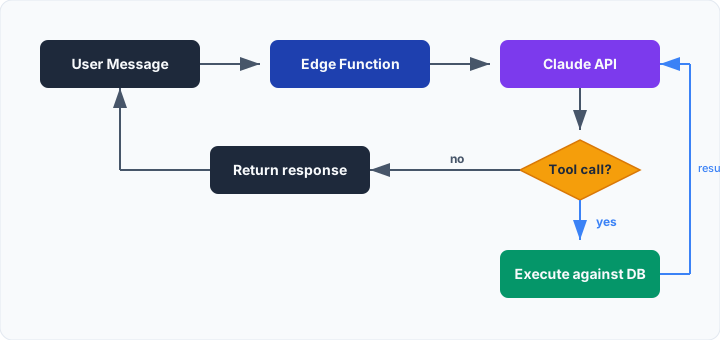
The edge function is a Supabase Edge Function that acts as a proxy between the frontend and the Claude API. It authenticates the user, builds the Claude request with tools, and executes tool calls against the database.
The key design decision is the tool loop. When Claude decides to create a record, the edge function executes the database insert and feeds the result back to Claude as a tool result. Claude might then create another record, ask a follow-up question, or summarize what it did. This loop continues until Claude responds with just text (no more tool calls), at which point the function returns.
The tools available to Claude mirror the app's data model:
create_asset— investments, retirement accounts, propertycreate_liability— mortgages, loans, credit card debtcreate_income— salary, freelance, side incomecreate_expense— rent, groceries, subscriptionsupdate_profile— goals, age infocomplete_onboarding— marks onboarding done, writes a summary
Each tool inserts directly into the database with the authenticated user's ID. By the time the conversation is done, the user's dashboard is fully populated with real data.
The System Prompt
The system prompt is where the domain knowledge lives. It teaches Claude the FI concepts that matter for the app:
- The 25x rule (FI number = 25x annual expenses)
- What yielding assets are and why they matter
- How savings rate is calculated
- Reasonable yield rates and growth rates for common asset types
It also defines conversation flow guidance — start with goals, then expenses, income, assets, debts — but explicitly tells Claude to be flexible and adapt if the user volunteers information in a different order.
One important behavioral rule: confirm before creating records. The agent should say "I'll create a $4,200/month expense record for your total monthly expenses" before actually calling the tool. This gives the user a chance to correct mistakes before data hits the database.
Conversation History
The first version sent only the text content of previous messages to Claude on each request. This meant Claude had no memory of its own tool calls — it didn't know what records it had already created. The result: duplicate records.
The fix was to return the full message chain from the edge function, including the raw tool_use and tool_result message blocks. The frontend stores these in a ref and sends them back as conversation history on each subsequent request. Claude sees its own prior tool calls and their results, so it knows exactly what's been created.
The display messages (what the user sees in the chat) remain simple — just text and created record cards. The API conversation history is a separate, richer data structure that preserves the full tool interaction chain.
The Frontend
The chat UI is straightforward: a message list with auto-scroll, a text input, and a header with a "Skip to Dashboard" button. Messages are styled as bubbles — user messages right-aligned, assistant messages left-aligned. When the agent creates a record, a compact card appears below the message showing the record type, name, and value.
The hook manages two parallel data structures:
messages— the display state (simple text + record cards)apiHistoryRef— the full API conversation history (tool calls included)
On completion, the agent calls the complete_onboarding tool, the response includes an onboardingComplete flag, and the UI swaps the input for a "Go to Dashboard" button.
What Makes This Better
Natural language parsing removes friction. "I make about 120k" becomes a $10,000/month income record. "We spend maybe 4k a month total" becomes an expense record. Users don't need to think about which field to put a number in or what format to use.
Concepts get explained in context. When the agent asks about investments, it can naturally explain yield rates: "For a broad index fund, a yield rate around 2% and growth rate around 7-10% would be typical." This happens in conversation, not as a tooltip the user has to hover over.
The flow adapts to the user. If someone opens with "I have $200k in student loans and I want to get out of debt," the agent starts with liabilities instead of forcing them through a goal-selection step first. The conversation goes where the user takes it.
More data gets captured. In the wizard, users entered a single total expense number. In conversation, they naturally break things down — rent, car payment, groceries, subscriptions — which gives the dashboard much richer data to work with.
Skip still works. The "Skip to Dashboard" button is always available. Any records created during the conversation persist even if the user skips partway through. There's no all-or-nothing commitment.
Where Else Does This Apply?
I built this for a financial tracking app, but the pattern fits anywhere you have a multi-step form and a domain where users need guidance:
- Health & fitness apps — "I run three times a week and do yoga on Sundays" beats picking from dropdowns
- Project management setup — describe your team and workflow instead of configuring boards and columns
- Insurance or lending applications — complex forms with conditional logic are natural conversations
- Any product with domain-specific jargon — if users Google your field labels, a conversational agent will onboard them better than a form
The ingredients are simple: a clear data model that maps to tool definitions, a domain where users benefit from explanation, and a flow where rigid ordering adds friction rather than clarity. Most onboarding flows check all three boxes.
The conversational approach isn't just a UI change — it fundamentally changes what data you collect. When you let users describe their situation in their own words, you get richer, more accurate data. And when the agent can teach concepts while collecting that data, users start their experience with understanding rather than confusion.
Onboarding is just the starting point. For FreedomTrack, I'm already building out additional agents — a Data Management Agent for natural language updates to your finances, a Monthly FI Review Agent that proactively analyzes your progress, and a Scenario Advisor Agent for exploring "what if" questions about your FI path. Once the pattern clicks, you start seeing agent-shaped opportunities everywhere in your product.
Want to see this in action? Try the conversational onboarding at FreedomTrack.io — it's free, and you'll have your FI dashboard populated in a couple minutes.
If you're looking at your own product's onboarding (or any workflow that could benefit from conversational AI) and thinking "this could work for us" — I'd love to chat. I build these kinds of agentic integrations for teams. Hit the "Get in Touch" button below or reach out on LinkedIn.